 Patent Office Actions
Try it on a public Office Action
The app carries one. Try the sample, under Draft a response to an Office Action on its opening page, opens the non-final rejection of application 18/541,216, mailed July 8, 2024, with the claims it examined and the specification, public record, already read.
Open the sample, and read the action
The action lists each rejection, objection and requirement the action states, with its claims, ground and references in the examiner's words, every quotation checked against the paper. Its first due date and final deadline are each marked as an estimate, beside the note that the program is not a docketing system: your docket is the system of record, and How these dates were counted shows the counting. On the sample the dates are long past; it is a record from 2024.
Open an item
Address the Rejections and Objections lists the three rejections with their state. Open one to see the examiner's statement, The action's words for this item, and Show the examiner's citations, limitation by limitation. On a paper you add as a PDF, a quotation also opens at its page, and with a reference fetched, Open FIG. beside a cited figure opens the reference's drawing sheet that shows it. The claims, the step before, sets the whole claim set beside the examiner's citations, each independent claim with its dependents beneath it.
Choose an approach
Under Response approach, choose arguments, amendments, both, or canceling the claims, or a terminal disclaimer for nonstatutory double patenting; or give every item without one arguments and amendments in one click. You select the response approach for each item; the app generates draft text based on your selection. Then Draft proposed units, which needs a model (set up drafting).
Add what you keep
Each drafted unit says what it is. Text marked From the record is written from the prosecution record without an AI model; Suggested text is AI-generated; Review marks text a check flagged or whose review scope you have not confirmed. All of it requires practitioner verification. Each goes into your reply with Add to draft, or is edited or dismissed, and keeps its history. A statement that a reference does not describe something goes in only once you confirm what you reviewed.
Read the reply, and take it to Word
The reply assembles what you added, a section for each item; read it as a Document. A note goes on a section or on the whole reply under Notes on this reply, and Reply in Word writes it as a Word file laid out as a filed response, with no note in it.
Try this first: open the § 101 rejection, choose arguments and amendments, and add one drafted unit to the reply.
The sample, pictured
The three steps on the sample, captured from the release with the app's own buttons, drafted locally. Each opens at full size.
The action
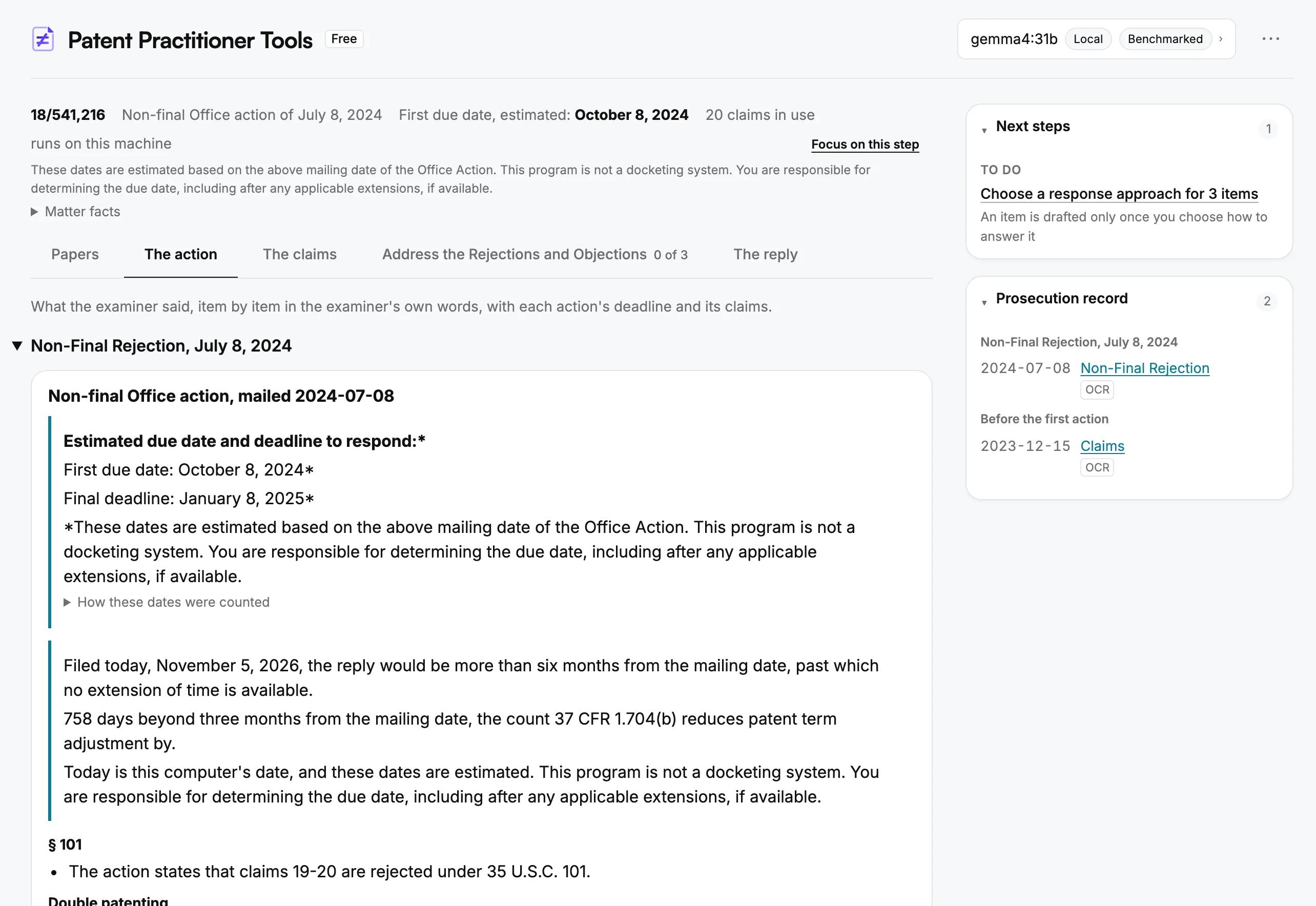
- The matter's line, above every step: the action, its first due date, estimated, and the claims in use.
- Next steps lists what the reply still needs, each linking to the step where it is done.
- Prosecution record lists the papers read, by round.
- The first due date and the final deadline, each an estimate, beside the note that the program is not a docketing system: your docket is the system of record. How these dates were counted is one click below.
- What filing a reply today would mean, against this computer's date, with the same warning: the program does not docket.
Address the Rejections and Objections, one item open
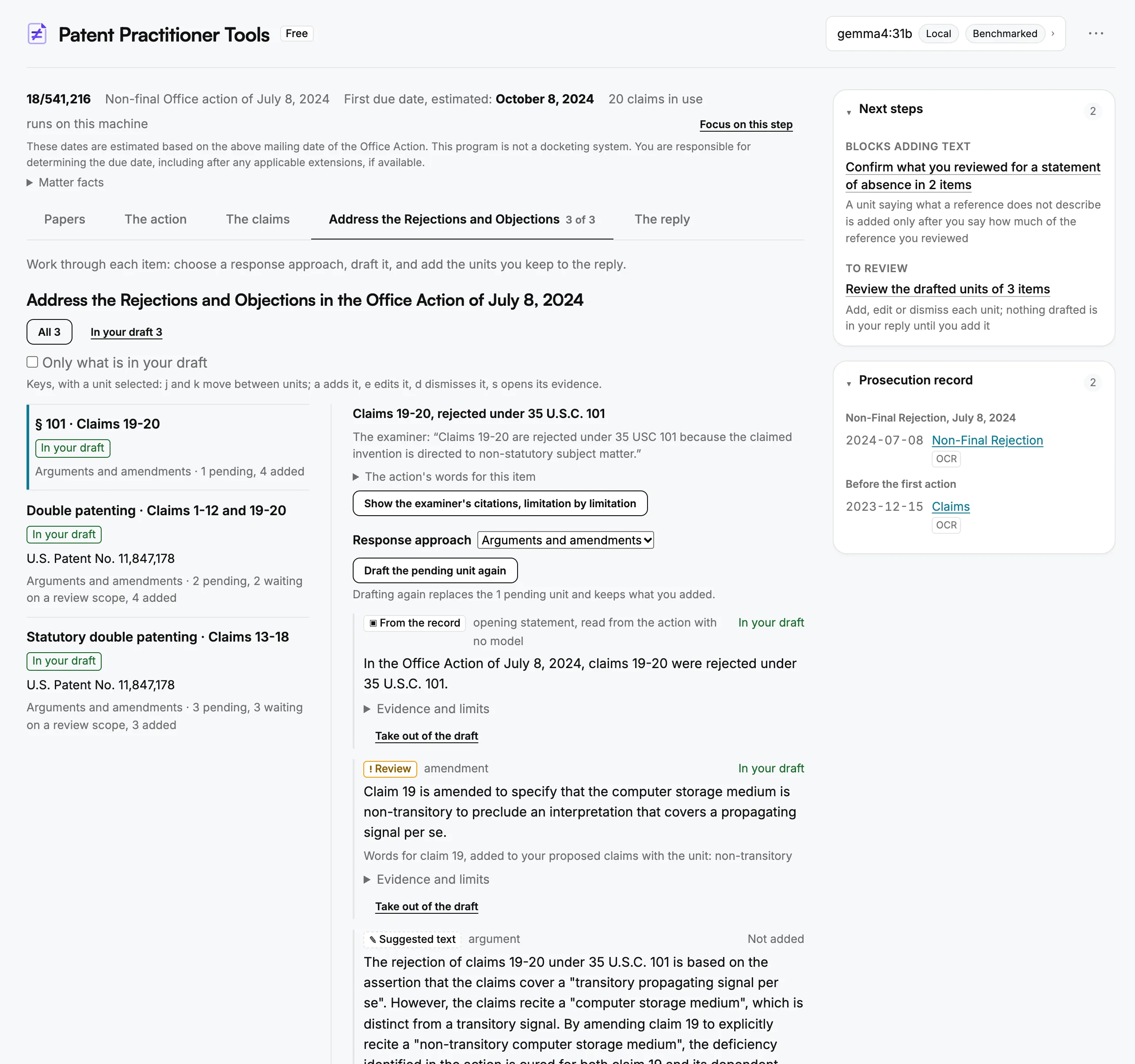
- Next steps holds back a statement that a reference does not describe something until you confirm what you reviewed.
- The items, filterable by state, from no approach chosen to reviewed.
- Each item's row: its statute and claims, the references by name, its approach and its counts of units.
- Response approach is yours to select for each item; the app generates draft text based on your selection.
- From the record is written from the prosecution record without an AI model; Suggested text is AI-generated; Review marks text a check flagged. All of it requires your verification.
- An amendment added to the reply writes its words into the claim it names, in your proposed claims.
- Not added marks a unit waiting on Add to draft; nothing drafted is in your reply until you add it, and Edit and Dismiss keep its history.
The reply, as a Document, with a note
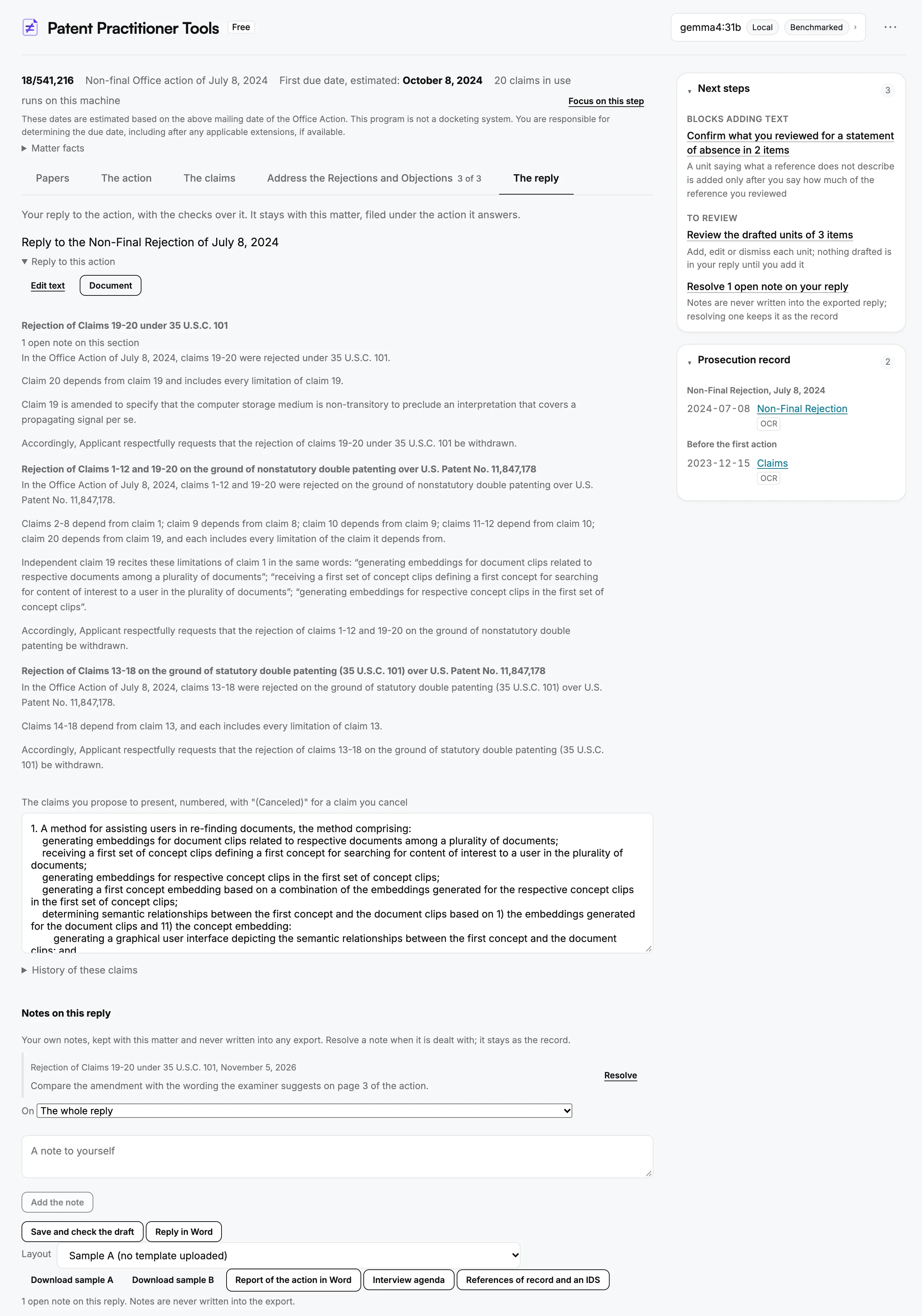
- Document reads the reply as one document; Edit text is where its words are typed.
- Next steps counts the open notes beside what the reply still needs.
- An open note, marked on the section it is about.
- A section for each item, holding the units you added to it.
- Your proposed claims, which an added amendment writes into; History of these claims lists each change.
- Notes on this reply stay with the matter on this computer, resolved rather than deleted.
- Reply in Word writes the reply as a Word file laid out as a filed response, in the Layout chosen beneath it, with no note in it.
A reading of the same file, printed unedited
The record reader over the Non-Final Rejection and the Notice of Allowance
of application 18/541,216, a public, granted Patent Center file, captured
on September 30, 2026 on qwen3.5:9b running locally and
printed here unedited. Captured before version 0.6.5 added objections, requirements and
statements of claim status, so it shows the rejections and the reasons for allowance.
How to read it
This is one reading, on one model, of one public file. Re-running the same reading can produce a different report, because the reader is a language model. It reports what the paper says, not whether a rejection was right.
The rejections, as the reader reported them
| Claims | Ground | References | Quotation, as the reader reported it |
|---|---|---|---|
| 19-20 | 35 U.S.C. 101 | none | Claims 19-20 are rejected under 35 USC 101 because the claimed invention is directed to non-statutory subject matter... The specification is silent to limit that such medium exclude signals. Therefore covers transitory propagating signal per se (non-statutory subject matter). See In re Nuijten... (not verified) |
| 1-12 and 19-20 | nonstatutory double patenting | U.S. Patent No. 11,847,178 | Claims 1-12 and 19-20 are rejected on the ground of nonstatutory double patenting as being unpatentable over the claims 1-12 and 19-20 of prior U.S. Patent No. 11,847,178... they are not patentably distinct from each other because they are directed to substantially the same invention. (not verified) |
| 13-18 | statutory double patenting | U.S. Patent No. 11,847,178 | Claims 13-18 are rejected under 35 U.S.C. 101 as claiming the same invention as that of claims 13-18 of prior U.S. Patent No. 11,847,178. (verified) |
This reading was made on September 30, 2026, before version 0.10.1. Since then, a quotation the model shortened with an ellipsis is looked for in the paper part by part, and shown in the paper's own words with each cut marked.
The examiner's reasons for allowance
Verified against the paper. The limitations the reasons credit, quoted by the reader:
Verified.
Verified.
Not verified: compare with the paper.
Quotations are checked against the text recognized from the scanned pages, which can carry scanning errors of its own, such as the run-together words above. A verified quotation matches that text; the page image in the file history is the authority.
What produced this
How well the reader does across more papers was measured, on this file and one other.
What it does with this record next
The app reads the file history in order to draft continuation claims against it. A complete drafting run, printed unedited with every defect the app flagged in its own output, is on the sister site's sample page.